What it is
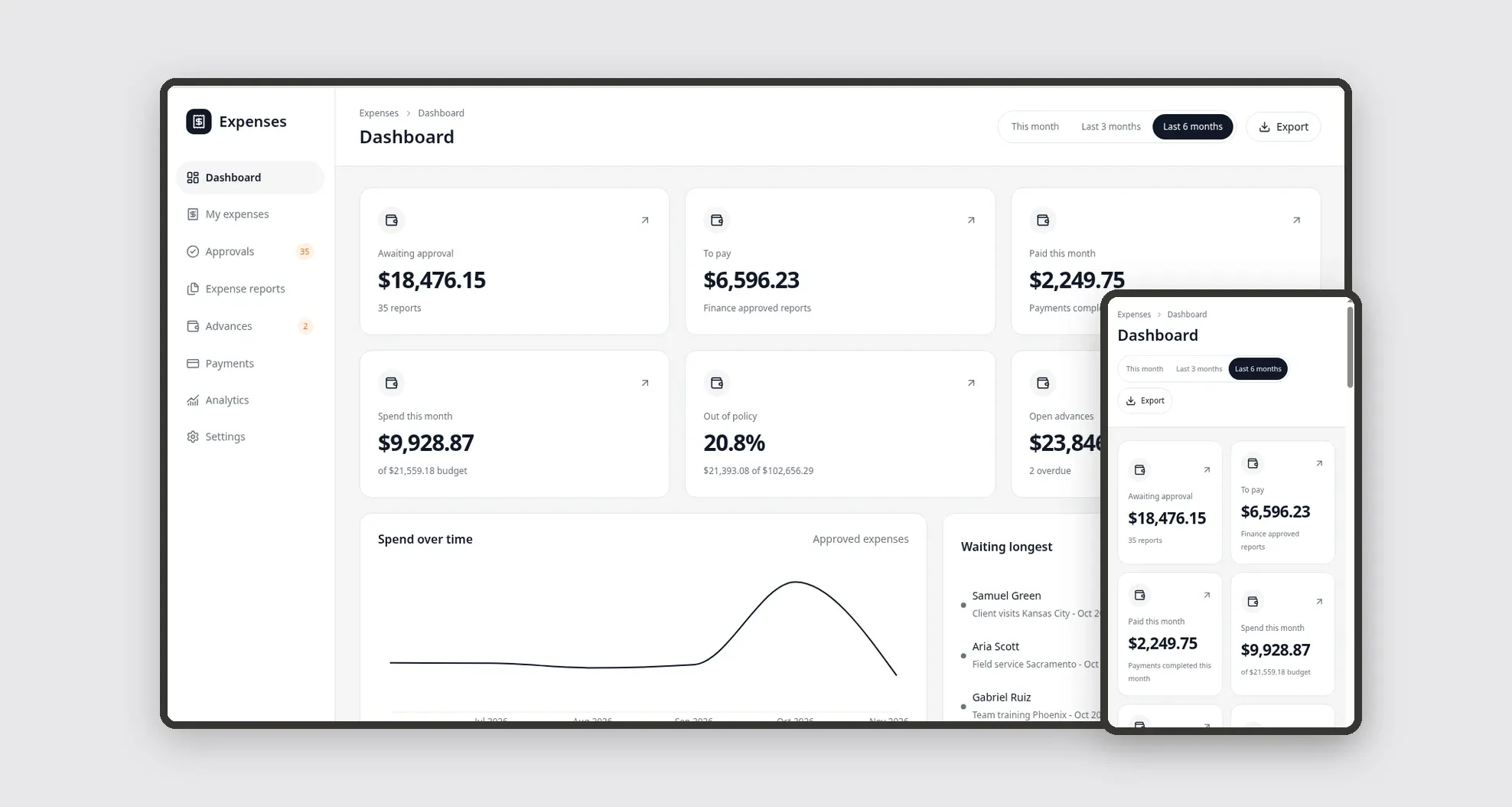
A template for companies with field teams and frequent travel to manage receipts, expense reports, travel advances and reimbursements in one place. Employees log expenses from the phone with a receipt photo, managers and finance approve in separate queues, and the dashboard shows what is awaiting approval, what is left to pay, this month's spend by cost center and what is out of policy. It comes with sample data from Northline Logistics Inc., a fictional company.
Who it's for
- Mid-size companies with sales, operations or fleet teams that travel and visit clients
- Employees who need to log expenses and attach receipts quickly from the phone
- Managers who approve their team's expense reports
- Finance teams that check the expense policy, pay reimbursements and track advances
- Leaders who follow spend by employee, cost center and category
What you can do
- Log an expense in My expenses with a receipt photo or PDF, amount, date, category, vendor, receipt number and description
- Group unassigned expenses into an expense report and follow its current stage on a progress line
- Approve, return for changes or reject reports with a required reason in the manager and finance queues, disallowing items one by one
- See items over the policy limit or missing a receipt highlighted, with the employee's justification
- Track travel advances with balance, linked report, amount to return and overdue settlements
- Record reimbursement payments by ACH, check or payroll and keep a receipt-style payment view
- Follow on the Dashboard the amount awaiting approval, to pay, paid this month, spend this month vs. budget, out of policy and open advances
- Analyze spend by employee, cost center and category, the share within policy and the average time to pay
App features
Dashboard
Follow on the Dashboard the amount awaiting approval, to pay, paid this month, spend this month vs. budget, out of policy and open advances.
My expenses
Log an expense in My expenses with a receipt photo or PDF, amount, date, category, vendor, receipt number and description.
Approvals
The Approvals screen covers this part of the operation.
Expense reports
The Expense reports screen covers this part of the operation.
Advances
Track travel advances with balance, linked report, amount to return and overdue settlements.
Payments
Record reimbursement payments by ACH, check or payroll and keep a receipt-style payment view.
Analytics
The Analytics screen covers this part of the operation.
Settings
In Settings, set up the company, cost centers with budgets, categories with limits, vendors and employees with role and manager.
How it works
In Settings, set up the company, cost centers with budgets, categories with limits, vendors and employees with role and manager. The employee logs expenses with the receipt photo and creates an expense report in Draft.
On submit, the report goes to the employee's manager, who approves, returns it for changes or rejects it with a reason. After the manager approves, finance reviews it and approves or rejects.
In Payments, finance records the payment and the report moves to Paid, with any advance used already deducted. Each decision creates an approval record and is written to the Activity log.
How to set up this template
- 1Click Use App
Create your Jestor account and install Expense & Reimbursement. It works on desktop and mobile.
- 2In Settings
In Settings, set up the company, cost centers with budgets, categories with limits, vendors and employees with role and manager.
- 3The employee logs expenses with the receipt photo and creates
The employee logs expenses with the receipt photo and creates an expense report in Draft.
- 4On submit
On submit, the report goes to the employee's manager, who approves, returns it for changes or rejects it with a reason.
Integrations and customization
The template works on desktop and mobile and can be adapted without code.
- Works in the desktop and mobile browser; on mobile there is a bottom bar with Dashboard, My expenses, a "+" button for a new expense, Approvals and More, and the attachment opens the camera.
- Dark mode follows the Jestor theme automatically.
- Amounts in US dollars and dates in MM/DD/YYYY format.
- Administrator, Finance, Manager and Employee roles define what each person sees; users who are not in Employees sign in as Administrator.
- Categories, limits, cost centers, budgets and fields can be adapted in Jestor without code.
- The template does not read receipts automatically or send bank payments: receipt details and payments are recorded by the team.
And that's just the start: you can edit any part of this template and go much further just by asking Jestor's AI. Describe what you need, like a new field, automation, report or integration, and the AI builds or adjusts it for you, no code required.
Frequently asked questions
What are the approval stages?
A report goes from Draft to Submitted, through manager approval and then finance approval, and ends as Paid. At any approval it can be rejected with a reason or returned for changes, which sends it back to Draft.
Can someone approve their own report?
No. Each report is approved by the employee's manager and then by finance.
How do advances work?
An approved advance is paid to the employee and linked to the trip's report; the amount used is deducted from the reimbursement and any remaining balance shows as the amount to return.
How is spend this month calculated?
It is the sum of the approved amount of this month's expenses in reports that were not rejected, compared with the cost center budgets.
Is the sample data real?
No. The company, employees, vendors, tax IDs and receipt numbers are fictional.